Windows Driver Research Part 1 - Building drivers without Visual Studio
Table of Contents
Summary⌗
This is the first blog in a series diving into Windows driver internals. This post will show how to write a simple driver to facilitate our research purposes, and how you can build it without having to use Visual Studio.
I released a PowerShell script and sample project for building and signing basic drivers for further research purposes. You can download the project here.
Pre-requisites⌗
I did this with:
- Windows 11 24H2 (OS Build 26100.4652)
- Visual Studio 2022 (17.14.9)
- Windows SDK (26100.4654)
- Windows Driver Kit (WDK; 10.0.26100.2452)
Normal Driver Build Flow⌗
To figure out how to build a driver without Visual Studio, I first needed to figure out all of the steps Visual Studio was doing. I created a Kernel Mode Driver (KMDF) sample project in Visual Studio, then recorded all new processes with Procmon when building the solution. The process tree looks something like this:
devenv.exeMSBuild.exe- Each build action is executed via a new
Tracker.exeprocess- I didn’t dig into what exactly this does, but it looks like it wraps a build command in a way to feed status and output back into Visual Studio in a consistent way
<build command>
- Each build action is executed via a new
Here are all of the build commands that were executed:
"C:\Program Files (x86)\Windows Kits\10\bin\10.0.26100.0\x86\stampinf.exe" -d * -a amd64 -v * -k 1.15 -x -f x64\Debug\KMDFDriver1.inf

"C:\Program Files (x86)\Windows Kits\10\bin\10.0.26100.0\x86\tracewpp.exe" "-cfgdir:C:\Program Files (x86)\Windows Kits\10\bin\10.0.26100.0\wppconfig\rev1" -scan:trace.h -odir:x64\Debug\ -km Device.c Driver.c Queue.c

"C:\Program Files\Microsoft Visual Studio\2022\Community\VC\Tools\MSVC\14.44.35207\bin\HostX64\x64\CL.exe" @C:\Users\user\AppData\Local\Temp\MSBuildTemp\tmpc0e8d874f76946279f1d85c3891b5f6a.rsp

"C:\Program Files\Microsoft Visual Studio\2022\Community\VC\Tools\MSVC\14.44.35207\bin\HostX64\x64\link.exe" /ERRORREPORT:PROMPT @C:\Users\user\AppData\Local\Temp\MSBuildTemp\tmp87815697d3494c6e88cb1b7568717a28.rsp

"C:\Program Files (x86)\Windows Kits\10\bin\10.0.26100.0\x86\signtool.exe" sign /ph /fd sha256 /sha1 57980F863CD160F5A18506CE827A4881B7662953 "C:\Users\user\Desktop\vs_kmdf\KMDF Driver1\x64\Debug\KMDFDriver1.sys"

"C:\Program Files (x86)\Windows Kits\10\bin\10.0.26100.0\x86\inf2cat.exe" /os:10_x64 "/driver:C:\Users\user\Desktop\vs_kmdf\KMDF Driver1\x64\Debug\KMDF Driver1\\"

"C:\Program Files (x86)\Windows Kits\10\bin\10.0.26100.0\x64\drvcat.exe" "C:\Users\user\Desktop\vs_kmdf\KMDF Driver1\x64\Debug\KMDF Driver1\kmdfdriver1.cat" /set WdkVersion 10.0.26100.0 /set WdkAssemblyVersion 10.0.26100.4202

"C:\Program Files (x86)\Windows Kits\10\bin\10.0.26100.0\x86\signtool.exe" sign /ph /fd sha256 /sha1 57980F863CD160F5A18506CE827A4881B7662953 "C:\Users\user\Desktop\vs_kmdf\KMDF Driver1\x64\Debug\KMDF Driver1\kmdfdriver1.cat"
The final build directory contents after the build is finished:
PS C:\users\user\desktop\vs_kmdf\KMDF Driver1\x64\Debug> ls -name
KMDF Driver1
KMDF Driver1.tlog
Device.obj
Device.tmh
Driver.obj
Driver.tmh
KMDF Driver1.log
KMDF Driver1.vcxproj.FileListAbsolute.txt
KMDFDriver1.Build.CppClean.log
KMDFDriver1.cer
KMDFDriver1.inf
KMDFDriver1.pdb
KMDFDriver1.sys
KMDFDriver1.sys.recipe
Queue.obj
Queue.tmh
vc143.pdb
A couple things to highlight here:
- The SHA1 value (
57980F863CD160F5A18506CE827A4881B7662953) used in thesigntool.execommands corresponds to the hash of the the auto-generatedKMDFDriver1.cerfile. The cert is stored in the user certificate store as well, which is howsigntool.exepicks it up. CL.exeandlink.exearguments are passed through a temporary response file, but most of the flags can dumped from the Visual Studio UI. Along with those flags, several important environment variables are set to provide additional paths to reference:CAExcludePath,EXTERNAL_INCLUDE,INCLUDE,LIB, andLIBPATH.
Driver Signature⌗
One think you won’t see in the process list is anything that generates the certificate to sign the driver. Rather than executing a dedicated process, MSBuild.exe directly creates the certificate file:
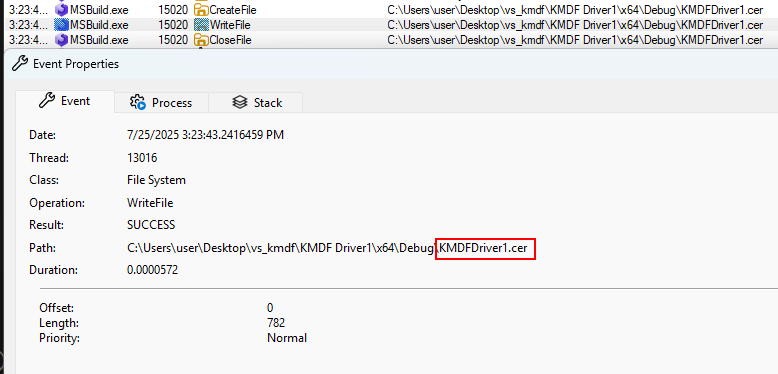
It also stores the driver into the local certificate store (via MSDN):

Manually building a driver⌗
Based on what was observed from Visual Studio, there are a few steps that are needed to build a usable driver:
- Generate a certificate
- Stamp the .inf file
- Compile the unit objects
- Link the objects into a .sys file
- Sign the .sys file
- Generate the catalog file
- Sign the catalog file
I wrote a PowerShell script and merged it with the sample KMDF project from Visual Studio, you can download the project template here. Once you run it, you end up with all of the artifacts needed to load and debug the driver:
PS C:\users\user\desktop\mydriver> .\build.ps1
Reusing existing 'driver_research' cert
Stamping .inf file
Generating wpp trace files
Compiling objects
Device.c
Driver.c
Queue.c
Running Code Analysis for C/C++...
Generating Code...
Linking objects
Signing driver
Done Adding Additional Store
Successfully signed: build\my_driver.sys
Generating catalog file
........................................
Signability test complete.

Errors:
None

Warnings:
None

Catalog generation complete.
C:\users\user\desktop\mydriver\build\my_driver.cat
Set catalog attribute.
WdkVersion: 10.0.26100.0
Set catalog attribute.
WdkAssemblyVersion: 10.0.26100.4202
Signing catalog file
Done Adding Additional Store
Successfully signed: build\my_driver.cat
However, if you try to install the driver, you will likely get a signature verification error:
PS C:\Users\user> sc.exe create my_driver binPath= C:\my_driver\my_driver.sys type= kernel
[SC] CreateService SUCCESS
PS C:\Users\user> sc.exe start my_driver
[SC] StartService FAILED 577:

Windows cannot verify the digital signature for this file. A recent hardware or software change might have installed a file that is signed incorrectly or damaged, or that might be malicious software from an unknown source.
This is caused by Driver Signature Enforcement (DSE), which requires that all drivers must be signed by a trusted Microsoft CA certificate. (MSDN). Since we signed the certificate ourselves, DSE blocks it from being loaded.
To bypass this for research purposes, we need to disable DSE by explicitly allowing test signed drivers to be loaded (MSDN). You can run this command to disable it, and you also may need to disable Secure Boot:
bcdedit.exe -set TESTSIGNING ON
Then, you can reboot and start the driver:
PS C:\Users\user> sc.exe start my_driver

SERVICE_NAME: my_driver
        TYPE               : 1  KERNEL_DRIVER
        STATE              : 4  RUNNING
                                (STOPPABLE, NOT_PAUSABLE, IGNORES_SHUTDOWN)
        WIN32_EXIT_CODE    : 0  (0x0)
        SERVICE_EXIT_CODE  : 0  (0x0)
        CHECKPOINT         : 0x0
        WAIT_HINT          : 0x0
        PID                : 0
        FLAGS              :
Next Steps⌗
In future blogs, I’ll share more tooling and research on Windows internals for how drivers are loaded, and the nitty gritty details of Driver Signature Enforcement. Stay tuned for more.
Misc Notes⌗
- Don’t store the Visual Studio solution/project on a VMware shared folder if you are working in a VM. You may encounter errors involving
stampinf.exenot running in the build process.- For some reason it wouldn’t properly stamp the
.inffile used for the driver; the file still had the placeholder$ARCHvalues. - This also impacts building without Visual Studio in build scripts that still rely on
stampinf.exe. - I believe this is due to some underlying weirdness in how
MapViewOfFileworks for files on a VMware HGFS share, not totally sure. - Full error:
Unresolved $ARCH$ token for section [standard.nt$arch$.10.0...16299]. Must run stampinf tool to resolve case sensitive $ARCH$ tokens.
- For some reason it wouldn’t properly stamp the
Appendixes⌗
Expanded code/command references from the above.
Appendix 1 - Full cl.exe flags from Visual Studio⌗
/ifcOutput "x64\Debug\" /GS /W4 /wd"4748" /wd"4603" /wd"4627" /wd"4986" /wd"4987" /Gy /Zc:wchar_t- /I"x64\Debug\" /analyze:"stacksize1024" /guard:cf /Zi /Gm- /Od /Fd"x64\Debug\vc143.pdb" /FI"C:\Program Files (x86)\Windows Kits\10\Include\10.0.26100.0\shared\warning.h" /Zc:inline /fp:precise /Zp8 /D "_WIN64" /D "_AMD64_" /D "AMD64" /D "DEPRECATE_DDK_FUNCTIONS=1" /D "MSC_NOOPT" /D "_WIN32_WINNT=0x0A00" /D "WINVER=0x0A00" /D "WINNT=1" /D "NTDDI_VERSION=0xA000010" /D "DBG=1" /errorReport:prompt /GF /WX /Zc:forScope /GR- /Gz /Oy- /Oi /FC /Fa"x64\Debug\" /nologo /Fo"x64\Debug\" /Fp"x64\Debug\KMDFDriver1.pch" /diagnostics:column
Appendix 2 - Full link.exe flags from Visual Studio⌗
/OUT:"C:\Users\user\Desktop\vs_kmdf\KMDF Driver1\x64\Debug\KMDFDriver1.sys" /MANIFEST:NO /PROFILE /Driver /PDB:"C:\Users\user\Desktop\vs_kmdf\KMDF Driver1\x64\Debug\KMDFDriver1.pdb" "C:\Program Files (x86)\Windows Kits\10\lib\10.0.26100.0\km\x64\BufferOverflowFastFailK.lib" "C:\Program Files (x86)\Windows Kits\10\lib\10.0.26100.0\km\x64\ntoskrnl.lib" "C:\Program Files (x86)\Windows Kits\10\lib\10.0.26100.0\km\x64\hal.lib" "C:\Program Files (x86)\Windows Kits\10\lib\10.0.26100.0\km\x64\wmilib.lib" "C:\Program Files (x86)\Windows Kits\10\lib\wdf\kmdf\x64\1.15\WdfLdr.lib" "C:\Program Files (x86)\Windows Kits\10\lib\wdf\kmdf\x64\1.15\WdfDriverEntry.lib" /RELEASE /VERSION:"10.0" /DEBUG /MACHINE:X64 /ENTRY:"FxDriverEntry" /WX /OPT:REF /INCREMENTAL:NO /PGD:"C:\Users\user\Desktop\vs_kmdf\KMDF Driver1\x64\Debug\KMDFDriver1.pgd" /SUBSYSTEM:NATIVE",10.00" /LTCGOUT:"x64\Debug\KMDFDriver1.iobj" /OPT:ICF /ERRORREPORT:PROMPT /MERGE:"_TEXT=.text;_PAGE=PAGE" /ILK:"x64\Debug\KMDFDriver1.ilk" /NOLOGO /NODEFAULTLIB /SECTION:"INIT,d"
Appendix 3 - Tracker.exe example⌗
"C:\Program Files\Microsoft Visual Studio\2022\Community\MSBuild\Current\Bin\amd64\Tracker.exe" @"C:\Users\user\AppData\Local\Temp\2989590ab7264df2b1442e8b34b5e4f4.tmp" /c "C:\Program Files (x86)\Windows Kits\10\bin\10.0.26100.0\x86\inf2cat.exe" /os:10_x64 /driver:"C:\Users\user\Desktop\vs_kmdf\KMDF Driver1\x64\Debug\KMDF Driver1\\"
That then executes the following command:
"C:\Program Files (x86)\Windows Kits\10\bin\10.0.26100.0\x86\inf2cat.exe" /os:10_x64 "/driver:C:\Users\user\Desktop\vs_kmdf\KMDF Driver1\x64\Debug\KMDF Driver1\\"
Appendix 4 - stampinf.exe output diff⌗
stampinf.exe sets a few fields in the .inf file:
$ diff before.inf after.inf
11c11
< DriverVer   = ; TODO: set DriverVer in stampinf property pages
---
> DriverVer = 07/25/2025,15.23.40.937
28c28
< %ManufacturerName% = Standard,NT$ARCH$.10.0...16299 ; %13% support introduced in build 16299
---
> %ManufacturerName% = Standard,NTamd64.10.0...16299 ; %13% support introduced in build 16299
30c30
< [Standard.NT$ARCH$.10.0...16299]
---
> [Standard.NTamd64.10.0...16299]
55c55
< KmdfLibraryVersion = $KMDFVERSION$
---
> KmdfLibraryVersion = 1.15